
Context
Vision
The Medication Transfer program works on good, complete electronic transfer of medication data. For an up-to-date and complete medication overview for every healthcare provider and every patient. A basic set of medication data has been agreed in the Guideline for Transfer of Medication Data in the Chain. These basic data must be available to every healthcare provider who prescribes, provides or administers. Three information standards enable the registration and exchange of this basic set. These are the information standards Medication Process, Lab values for medication and CiO (Contraindications and hypersensitivities). The healthcare-wide implementation of the guideline and the associated information standards takes place within the Medication Transfer program. New agreements and procedures make network and chain care possible; the information standards included in software packages make digital data exchange possible.
Objectives
The Medication process program aims first to take away existing obstacles in the medication process, while taking into account current legislation and the possibility of obtaining tangible results in the foreseeable future.
Architecture:
The Healthcare Application Medicatieoverdracht consists of various parts:
-
business layer architecture by Nictiz
-
Information standards
-
functional requirements
-
information models
-
-
-
application layer architecture by VZVZ
-
application requirements
-
information models for data exchange on AORTA-LSP infrastructure
-
infrastructure integration specifications with centralized application services
-
This application layer architecture is related to the higher business layer architecture as formulated in Bedrijfsarchitectuur.
Terminology
AORTA 8 - Subscribe and notify
The terms; subscribe and notify need to be used instead of the legacy terms; signal, event and register.
In various documentation the legacy terms are still present.
Context diagram
This architecture is performed within a larger framework. See Nictiz page on Interoperabiliteit. This application mainly addresses Application and IT-infrastructure.
Business Processes
Business Processes MP9
The main business processes withn MP9 are typically triggered by patient encounters and/or receival of medication data.
The identified processes are:
-
Prescribe
-
Medication verification by prescriber
-
-
Dispense
-
Medication verification by pharmacist
-
-
Administer
-
Administration list
-
Administration Registration
-
-
Use
-
Medication Use Registration
-
At the start or during a business process relevant data may be received are retrieved.
At the middle of a business process, an external Healthprofessional may be contacted with proposals.
At the end of such a business process, data is exchanged. Data can be sent or be made available.
Relevant Business Processes per Information System category
The prescriber and the pharmacist as well as other administrators and patients (optional) all make use of an information system, respectively,
-
an electronic prescribing system (‘elektronisch voorschrijfsysteem’ - EVS),
-
an electronic client file (‘elektronisch cliëntendossier’ - ECD),
-
a pharmacist information system (‘apothekersinformatiesysteem’ - AIS),
-
a hospital pharmacist information system (‘ziekenhuisapotheekinformatiesysteem’ - ZAIS),
-
an administration registration system (‘toedieningsregistratiesysteem’ - TRS),
-
a thrombosis service information system (‘trombosedienstinformatiesysteem’ - TrIS)
-
and a personal health environment (‘persoonlijke gezondheidsomgeving’ - PGO).
These information systems each have different system roles which enable the exchange of data between these information systems as part of the administration process. The information systems may have a function in compiling an administration list, and in the registration, the exchange and the delivering of an MTD.
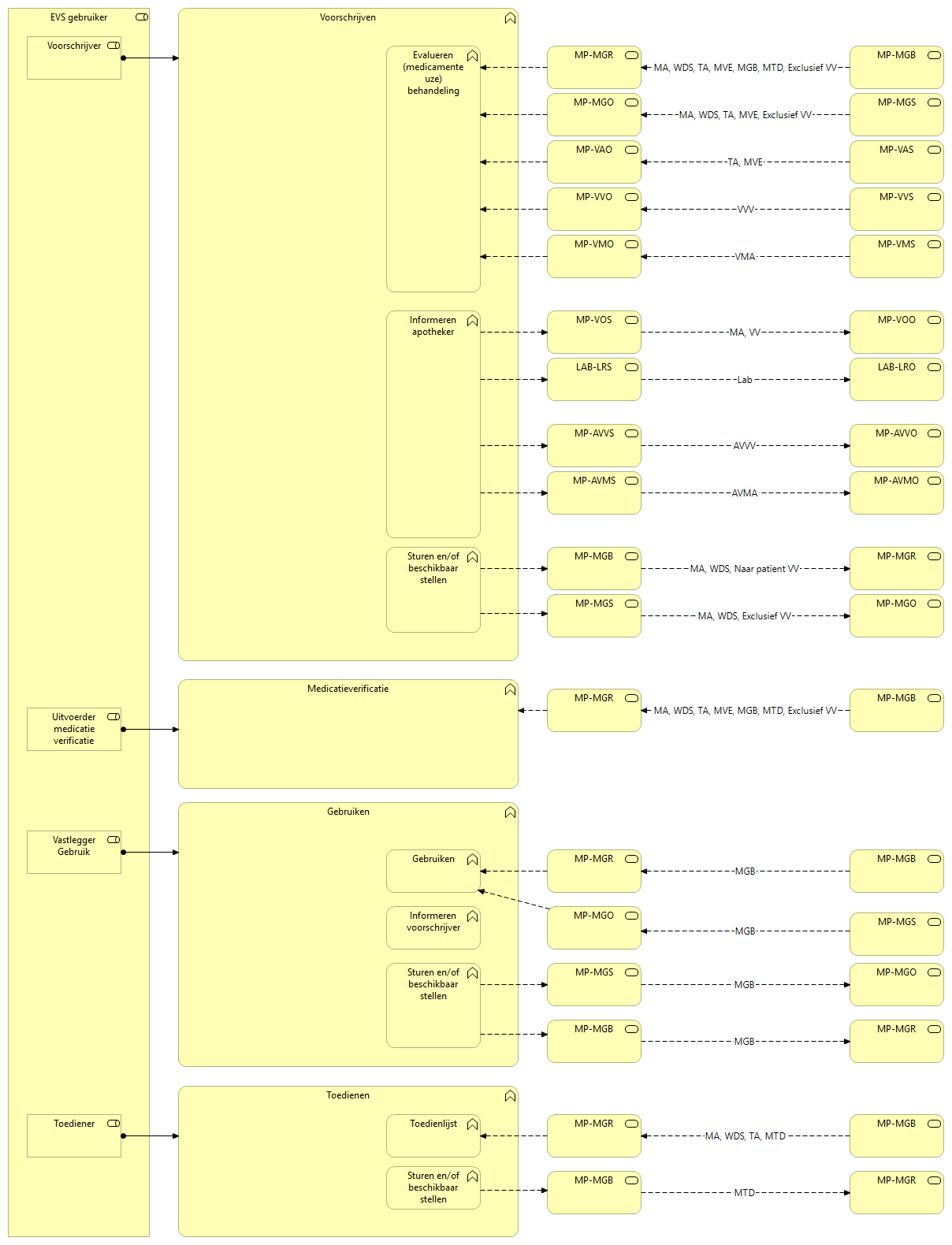
Prescriber (EVS user)
Electronic prescribing system (‘elektronisch voorschrijfsysteem’ - EVS)
a thrombosis service information system (‘trombosedienstinformatiesysteem’ - TrIS)
The role of prescriber may be performed by anyone with a prescribing authorisation.
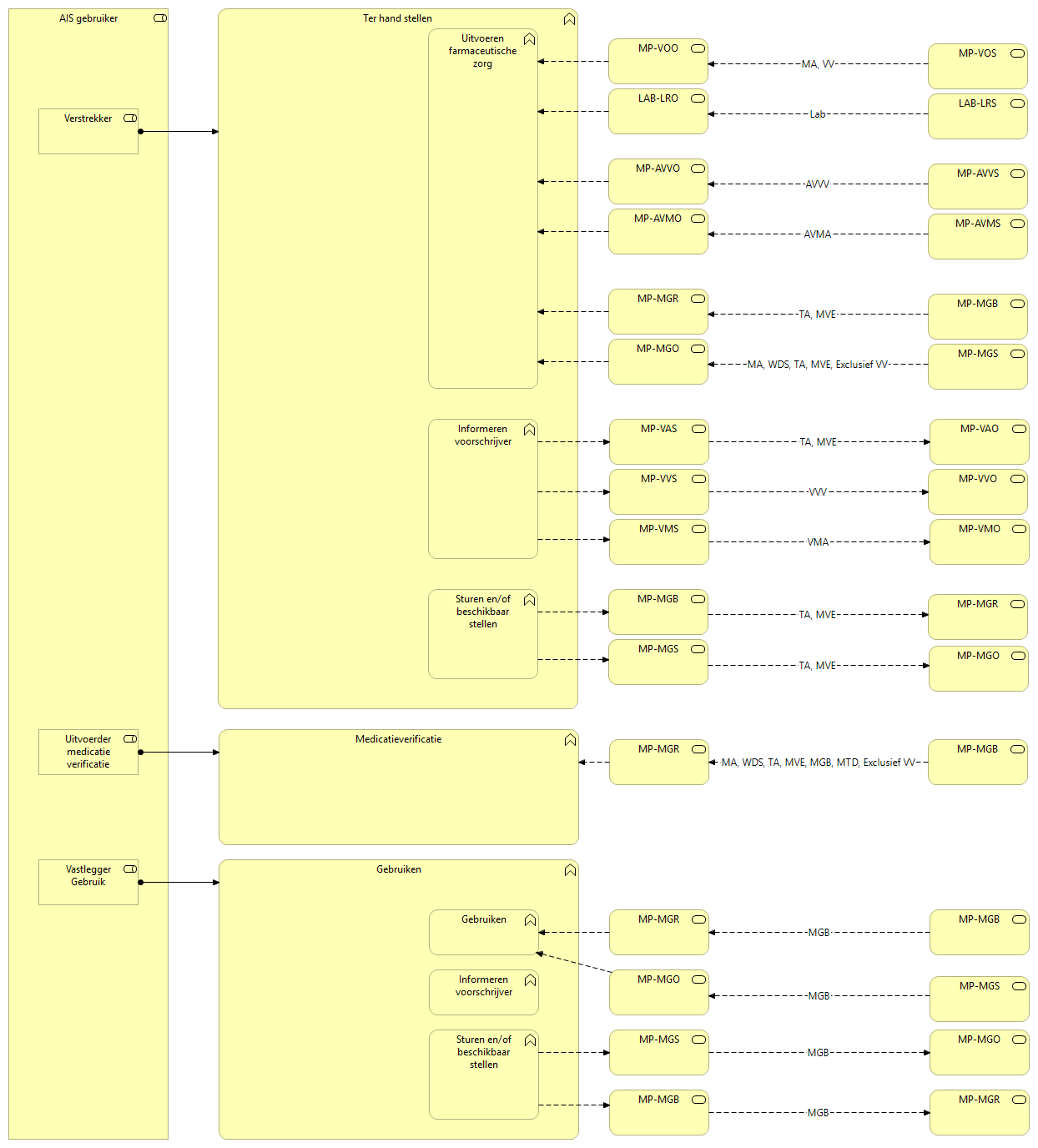
Dispenser (AIS user)
a pharmacist information system (‘apothekersinformatiesysteem’ - AIS)
a hospital pharmacist information system (‘ziekenhuisapotheekinformatiesysteem’ - ZAIS)
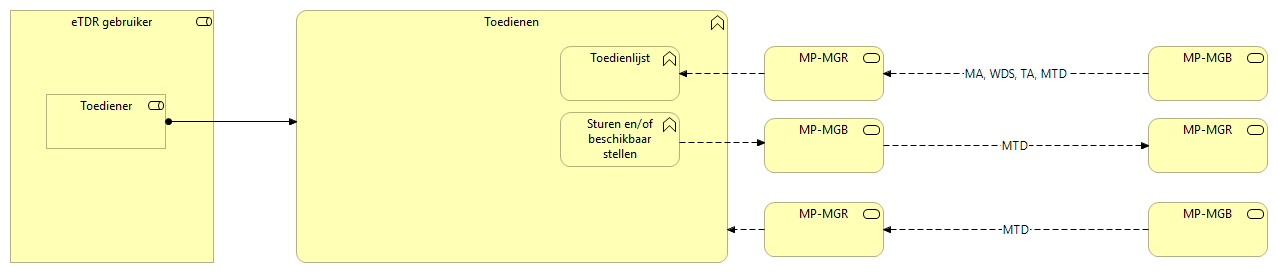
Administrator (eTRS user)
an administration registration system (‘toedieningsregistratiesysteem’ - TRS)
Business Process Medication data (PULL)
Context
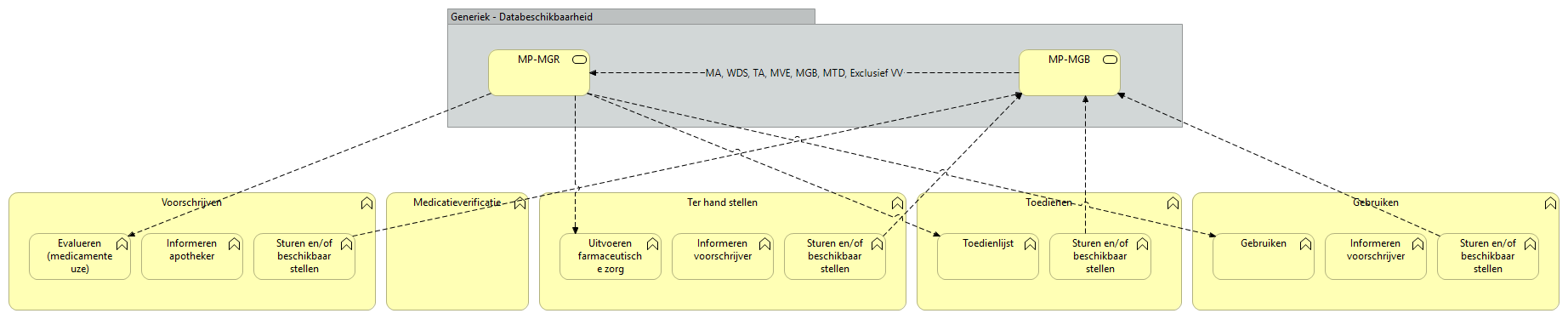
Functioneel Ontwerp Medicatieproces 9 versie 3.0.0-rc.2 - informatiestandaarden
|
Systeemrol |
Afkorting |
Transactie |
Mogelijk betrokken bouwstenen |
|---|---|---|---|
|
Scenario Medicatiegegevens |
|||
|
MedicatieGegevensBeschikbaarstellend |
MP-MGB |
Beschikbaar stellen medicatiegegevens |
Eén of meer:
|
|
MedicatieGegevensRaadplegend |
MP-MGR |
Raadplegen medicatiegegevens |
|
Trigger
-
Notification of new medication data availability
-
Patient encounter
Steps
-
consulting information system pulls the Medication data
-
LSP-AORTA
-
acts as an end-point for request from HealthProfessionals and/or Patients
-
allows for HL7v3/CDA and/or FHIR based requests
-
handles the generic query request
-
splits the generic query into specific queries towards the source information systems
-
transforms request where needed for compatibility
-
routes requests towards the relevant source information systems
-
-
consulted information system makes medication data available
-
LSP-AORTA
-
transforms response where needed for compatibility
-
aggregates responses into a single response bundle
-
responds to the consulting information system
-
Postcondition
-
Consulted medication data and/or errors is available in the consulting information system
Business Process Medication data (PUSH)
Context
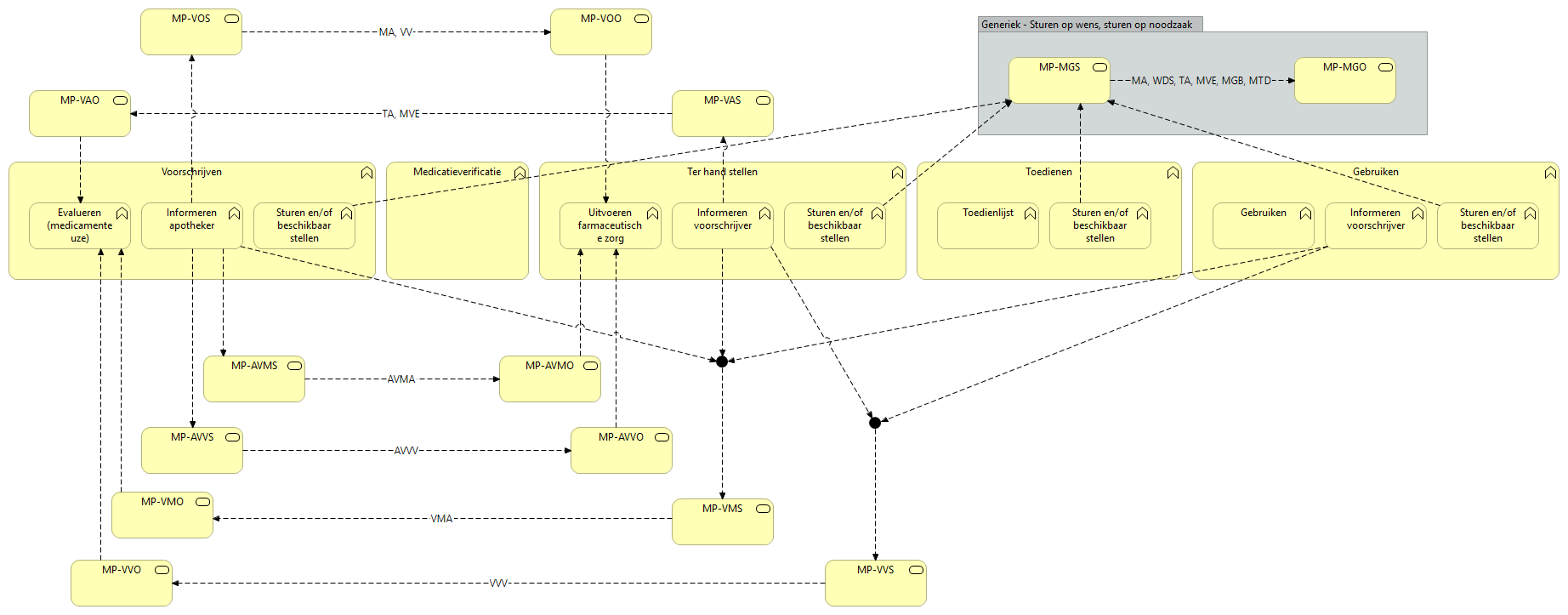
Functioneel Ontwerp Medicatieproces 9 versie 3.0.0-rc.2 - informatiestandaarden
|
Systeemrol |
Afkorting |
Transactie |
Mogelijk betrokken bouwstenen |
|---|---|---|---|
|
Scenario Medicatievoorschrift |
|||
|
VoorschriftSturend |
MP-VOS |
Sturen medicatievoorschrift |
MA met of zonder VV; eventueel Lengte, Gewicht
|
|
VoorschriftOntvangend |
MP-VOO |
Ontvangstbevestiging medicatievoorschrift |
|
|
Scenario Afhandelen medicatievoorschrift |
|||
|
VoorschriftAfhandelingSturend |
MP-VAS |
Sturen afhandeling medicatievoorschrift |
TA met of zonder MVE |
|
VoorschriftAfhandelingOntvangend |
MP-VAO |
Ontvangstbevestiging afhandeling medicatievoorschrift |
|
|
Scenario Medicatiegegevens |
|||
|
MedicatieGegevensSturend |
MP-MGS |
Sturen medicatiegegevens |
Eén of meer:
|
|
MedicatieGegevensOntvangend |
MP-MGO |
Ontvangstbevestiging medicatiegegevens |
|
|
Scenario Voorstelgegevens |
|||
|
VoorstelMedicatieafspraakSturend |
MP-VMS |
Sturen voorstel medicatieafspraak |
VMA met of zonder Lengte, Gewicht |
|
VoorstelMedicatieafspraakOntvangend |
MP-VMO |
Ontvangstbevestiging voorstel medicatieafspraak |
|
|
AntwoordVoorstelMedicatieafspraakSturend |
MP-AVMS |
Sturen antwoord voorstel medicatieafspraak |
AVMA |
|
AntwoordVoorstelMedicatieafspraakOntvangend |
MP-AVMO |
Ontvangstbevestiging antwoord voorstel medicatieafspraak |
|
|
VoorstelVerstrekkingsverzoekSturend |
MP-VVS |
Sturen voorstel verstrekkingsverzoek |
VVV |
|
VoorstelVerstrekkingsverzoekOntvangend |
MP-VVO |
Ontvangstbevestiging voorstel verstrekkingsverzoek |
|
|
AntwoordVoorstelVerstrekkingsverzoekSturend |
MP-AVVS |
Sturen antwoord voorstel verstrekkingsverzoek |
AVVV |
|
AntwoordVoorstelVerstrekkingsverzoekOntvangend |
MP-AVVO |
Ontvangstbevestiging antwoord voorstel verstrekkingsverzoek |
|
Trigger
-
New data, requests, proposals and/or replies have been created and are being made available
-
MP9 Process step: ‘Send and/or make available’
Steps
-
source information system sends the data, request, proposal or reply
-
LSP-AORTA
-
acts as an end-point for send-request from HealthProfessionals and/or Patients
-
allows for HL7v3/CDA and/or FHIR based requests
-
handles the send request
-
transforms send request where needed for compatibility
-
routes the send request towards the relevant receiving information system
-
-
receiving information system handles the receival with acknowledgment
-
LSP-AORTA
-
transforms response where needed for compatibility
-
responds to the sending information system
-
Postcondition
-
Send medication data and/or errors is received in the receiving information system
Business Transaction specific Dataset constraints
The dataset needs to adhere to the constraints set by the transaction
Per transaction in the data model in ART DECOR, in the Condition column, refinements are found on attributes. The implementation needs to adhere to these.
These refinements are often the same for all transactions, but sometimes they differ per transaction.
For example, when sending a prescription, there are some fields that are not needed in the prescription and therefore we do not expect them in the prescription. However, when you request and provide medication data, those fields would be included. There are small discrepancies between what is transmitted in one transaction and another.
The advice is to build the building blocks in such a way that you can hide or include attributes in that building block depending on the interaction.
This is also future-proof if you need to move to a newer version of FHIR or other transport protocols.
As implementor, the differences will become apparent, when you Compare transactions side by side.
On big difference is between prescription and medication agreement.
-
The phone number is mandatory when sending a prescription, but it must not be included when making a medication agreement available (important - we also qualify on this).
-
The VV relationship to MA (1-) on (0-) depends on the migration.
The information per transaction can be found in the ZorgView column under:
| Title |
|---|
Business Data
See Raadpleging en Abonnement - Contexten